
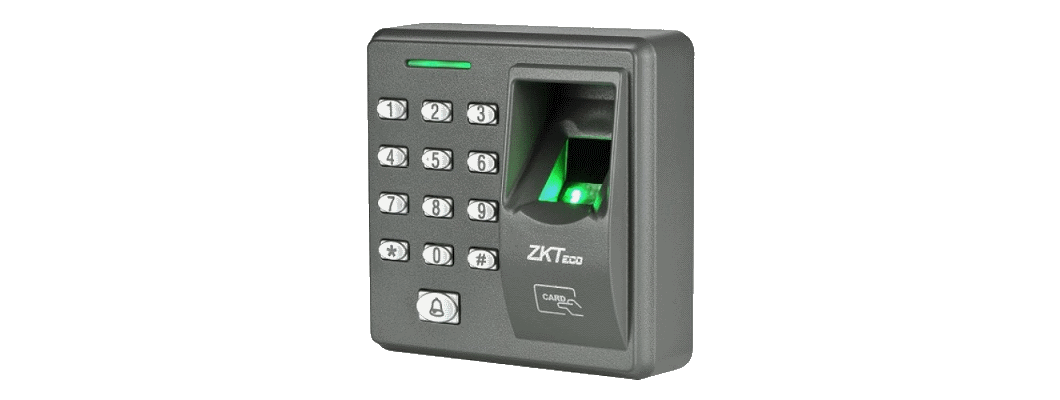
Quick answer: In a rented office you can usually add proper access control without replacing or cutting the door. The common setup is a surface-mounted magnetic lock fixed to the top of the frame, a fingerprint or face terminal on the wall beside the door, an exit button inside, and cables run in trunking. Glass doors can take clamp-on lock brackets with no drilling into the glass. When you move out, the kit comes off with a few screw holes to fill. Get the landlord's written approval first, and make sure the lock releases on a fire alarm or power cut.
What landlords usually object to
- Cutting the door or frame, for example for an electric strike or a mortice lock.
- Drilling into glass doors or glass partitions.
- Cables chased into walls.
- Anything that changes how the fire exit works.
The good news is that none of these is necessary for a standard office door.
The "no door change" kit
| Part | Where it goes | Drilling needed |
|---|---|---|
| Magnetic lock (maglock) | Surface-mounted on the top of the frame, armature plate on the door | A few screws into the frame and door top |
| Glass door brackets | Clamped onto frameless glass doors | None in the glass |
| Access terminal | On the wall beside the door, outside | Wall plugs only |
| Exit button | On the wall inside | Wall plugs only |
| Emergency break-glass | Inside, near the door | Wall plugs only |
| Power supply with battery | Above the ceiling or in a cupboard | None |
| Cables | In surface trunking along walls | Trunking screws or adhesive |
Choosing the terminal
| Office | Terminal | Why | Price incl. VAT |
|---|---|---|---|
| Up to about 20 staff, one door | ZKTeco X6 | Fingerprint and card, simple to set up | SAR 444.02 |
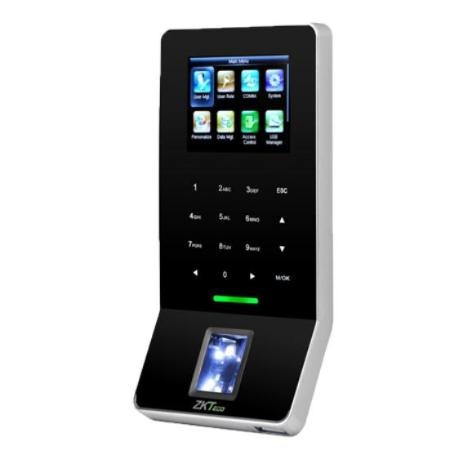
| No network cable near the door | ZKTeco F22 | Wi-Fi option, fingerprint and card | SAR 626.18 |
| Narrow aluminium door frame | ZKTeco BioPro SA40 | Slim body fits narrow mullions | SAR 1,013.27 |
| Touchless, face plus fingerprint | ZKTeco SenseFace 3 | Face recognition for a busy reception | SAR 1,650.83 |
Most of these also record attendance, so one device can cover the door and the time sheet. Add proximity cards (SAR 5.69 each) for visitors and cleaners.
Fire safety comes first
A magnetic lock holds the door only while it has power. That is what makes it safe: on a power cut or fire alarm, it releases. Make sure your installation:
- is fail-safe (unlocks without power) on any door used as an exit;
- is connected to the building's fire alarm so it releases automatically, where the building allows;
- has a green emergency break-glass inside the door;
- does not block a shared corridor or stair door that belongs to the building.
Ask the building management about their fire safety rules before installation. They may need to approve the connection to the fire alarm panel.
What to put in writing with the landlord
- A short description and a photo of the parts and where they go.
- Confirmation that the door and frame are not cut and glass is not drilled.
- How the lock behaves in a fire or power cut.
- That you will remove the kit and make good on moving out.
Moving out
Removal takes an hour or two: take off the terminal, lock and trunking, fill and paint the screw holes. The terminal, lock and power supply can go to your next office, and your staff enrolment moves with you if you keep the software and a backup.
Example: a 15-person office in a Riyadh tower
A consultancy rents half a floor with a frameless glass entrance door. The landlord forbids drilling the glass. The solution: a clamp-on bracket and maglock on the glass door, a slim fingerprint terminal on the wall beside it, an exit button and break-glass inside, and the power supply above the ceiling tile. Staff use their fingerprint; visitors are buzzed in by reception. Nothing touched the glass, and the whole kit can move with them.
Typical installation day
- Survey the door: type, frame, swing direction, distance to power.
- Fix the maglock and armature, adjust for a clean close.
- Mount the terminal, exit button and break-glass; run trunking.
- Connect power supply and battery; test fail-safe release.
- Enrol staff, set working hours, test with a few people.
Not sure what a controller or reader does? Start with access control by door type and fingerprint, face or card.
Common questions
Can we use the building's existing card system? Sometimes. If the tower already uses proximity or MIFARE cards at the lobby, a reader on your door that accepts the same card type saves staff carrying two cards. Ask building management which card type they issue.
Our door is a certified fire door. Is that a problem? Fire doors have rules about what can be fixed to them. Surface-mounted maglocks are often accepted, but check the door's certificate and the building's fire consultant before fitting anything.
What about battery smart locks? They avoid cabling and suit small rooms, but they replace the existing lock body, which landlords may not accept, and batteries need managing. For a main office door, a wired maglock and terminal is usually more reliable.
Does it work during a power cut? With a backup battery in the power supply, the door stays locked and the terminal keeps working for a period. When the battery runs out, a fail-safe lock releases, which is the safe default for an exit door.
Get a quote
Count Express installs access control for offices across Saudi Arabia from sales and distribution centres in Riyadh, Jeddah and Al Khobar. Send us a photo of your door and frame, and we will tell you what fits without changes. Send a photo on WhatsApp or browse access control.
Fire safety requirements depend on your building and local authority; follow them. Prices include 15% VAT and may change.
Leave a Comment